Check that you understand each other, without stopping the conversation.
What people say gathers under the topic it belongs to while they are still talking. A glance to the side shows where the discussion actually is, so a mismatch surfaces while you can still do something about it.



No signup. It's a short meeting between three people in three languages. The voices are synthetic; what you see on screen is the production system running on that conversation.
How the conversation comes back
Every line stacked in the order it was spoken. The shape of the discussion is buried in the transcript, and digging it out is on you.
The same words, collected under the topics they were about. Each topic shows how much was said. Open one to read it.
The actual screen
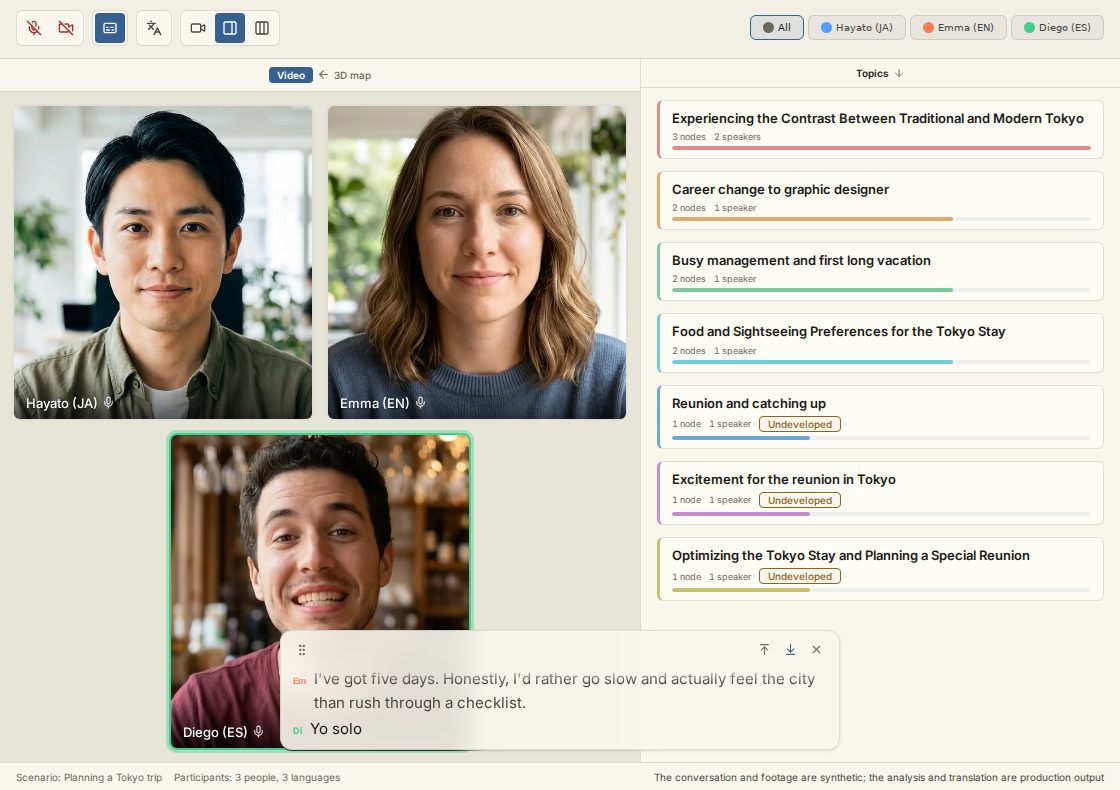
An ordinary video call
The other person's face comes through as it is.
Remarks gather by topic
While people talk, what they say gathers under the topics on the right. No one has to take notes.
Everyone picks their own language
The same conversation is interpreted into whichever language each person picked — to read and to hear.
Follow along in subtitles
What is being said also streams as subtitles, so you can follow the exact words with your eyes.
How it works
Open a room, everyone picks a language
Create a meeting link and send it around, up to twelve people. Each person picks the language they'll speak and read in. Nothing to install.
Talk, and watch topics form
While people speak, what they say collects under topics on the side. You can glance over and see which topics the conversation has covered so far.
Afterward, it's held by topic
The meeting stays sorted by topic. Come back a week later, open the topic you care about, and see what was said without replaying the whole call in your head.
Hand it over
Generate a draft report from the meeting, then fix it up right there: reword a line, drop a section, add a note. AWAI writes the first pass and you edit it into shape. The edit never calls the model, so it costs nothing, and the original stays intact underneath.
See for yourself whether the translation holds
People each speak and read in a different language, and the interpreted content arrives grouped by topic like everything else. You can follow whether what you said came through as you meant it, and whether the reply you are getting fits what you actually said. Simultaneous interpretation is unfamiliar to most people, and watching the topics build gives you something to check it against.
What people use it for
We built it as meeting analysis, but people also use it for the meeting minutes, and to keep a readable record of a call.
As the meeting minutes
By the time you stop talking, the meeting minutes are already there, grouped by topic. Nobody has to replay a recording and write them up afterwards.
For a recurring meeting
Keep every weekly meeting in the same shape, and you stop opening the meeting by trying to remember where the last one ended.
For a client or requirements call
What was decided and what was taken away sit in separate topics, so the record stays readable without scrolling a transcript.
For 1-on-1s
The conversation stays grouped by topic, so you can read back what the last one covered before the next one starts.
For internal talks and study sessions
People who were not in the room can still read it, topic by topic.
For interviews
What you heard is grouped by topic, so you can go back to the part you need without re-reading the whole transcript.
Why we built this
Anything that can be made more efficient, hand it to the AI. People still gather in a room because there are places you can't reach on your own. We don't really understand each other, not all the way down. But when understanding grows even a little, being around other people turns into something that carries you further. That's what we built this for.
Pricing
One point covers one minute of a meeting in a single language.
When people are speaking several languages, each language you translate into adds to the rate. A meeting running in three languages costs three points a minute.
A 40-minute meeting in three languages runs 120 points, so if you meet across languages regularly, Pro is the realistic place to start.
- Meeting
- 1 minute = 1 point
- Process analysis
- 5 nodes = 1 point
- Report
- 1 report = 10 points
If you run outTop up at $0.20 per point, from 5 points at a time. You do not need a subscription to buy them, and purchased points are valid for one year from the day you buy them. You buy them from your account settings.
- The 20 points to start and one free diagnosis ticket are a registration benefit. If you register with an email address and password, they are granted once you link a Google or Microsoft account (registering with a Google or Microsoft account grants them right away). The benefit is granted once per person, and those who have registered with us before are not eligible. However, if a year or more has passed since your previous account deletion, you become eligible again.
Questions people ask
What happens to the audio, where the data goes, and how the points work.
Can I use it for meeting minutes?
Do I get a transcript?
Is the meeting recorded and stored?
Do you analyze the video?
Is our conversation used to train AI models?
Where does the data actually go?
Who can see a meeting?
Can a meeting be made public?
Can I delete a meeting?
How long do you keep a meeting?
How many people can join?
Do participants have to install anything?
Does it work when everyone shares one language?
Which languages are supported?
If I set up translation, does an unused language still cost me?
Can I export my data?
See it before you sign up
Play the three-person, three-language demo and read a meeting the way AWAI leaves it. When you're ready, the free plan starts you with 20 points.
Play the demoNo signup. Or start free with 20 points.